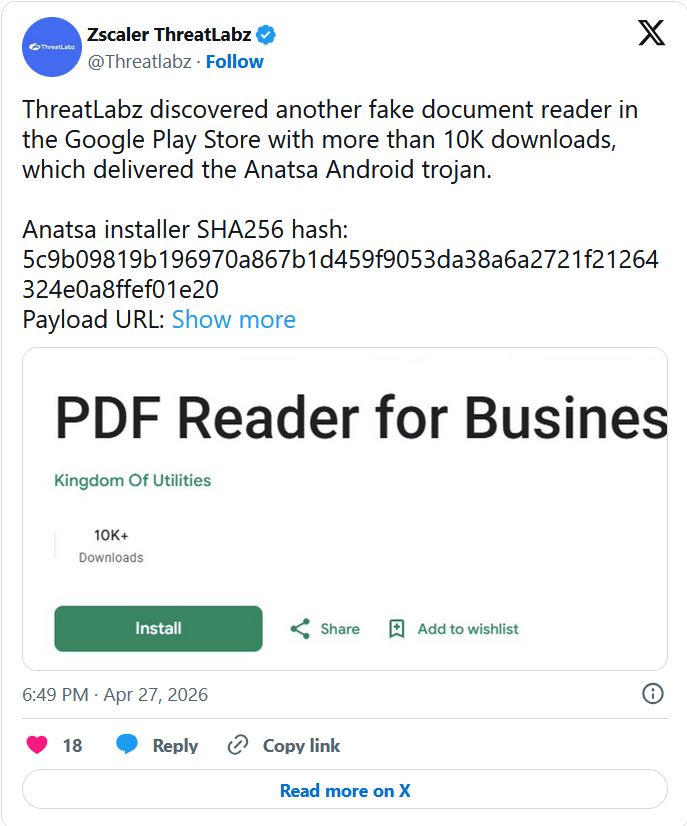
The Google Play Store’s perimeter has been breached again by a familiar foe. On April 27, 2026, researchers at Zscaler ThreatLabz revealed that a malicious document reader app successfully bypassed Google’s security filters, racking up over 10,000 downloads before being terminated.
The app was a delivery vehicle for Anatsa, a notorious banking trojan that has been evolving since 2020. This latest campaign is particularly aggressive, targeting customers of over 831 financial institutions worldwide, including a new wave of banks and cryptocurrency exchanges in South Korea and Germany.
The “Dropper” Strategy: How It Bypassed Google Play
Anatsa’s success lies in its patience. The malware developers used a sophisticated two-stage delivery (or “dropper”) technique to enter the official app store undetected.
- The Clean Entry: The app was submitted as a legitimate file manager (
com.groundstation.informationcontrol.filestation_browsefiles_readdocs). During Google’s initial review, the app contained no malicious code, appearing to be a helpful utility. - The Background Fetch: Once a user installed the “clean” app, it quietly connected to a remote server (
http://23.251.108[.]10:8080/privacy.txt) to pull down the real payload. - Silent Installation: The trojan was installed in the background without any visible alerts or permission prompts, effectively turning the “document reader” into a financial spy.
Technical Deep Dive: Evasion and Exploitation
Anatsa version 2026 is built to survive both automated security scans and human observation.
1. High-Level Privilege Abuse
Upon activation, the malware requests Accessibility Services permissions. While this feature is intended to help users with disabilities, Anatsa uses it to:
- Overlay Content: Display fake login pages over legitimate banking apps.
- Intercept SMS: Capture Two-Factor Authentication (2FA) codes.
- Keylogging: Record every keystroke, including passwords and PINs.
2. Anti-Analysis Defenses
To hide from security researchers, the malware performs emulation checks. If it detects it is running in a sandbox or a testing environment, it suppresses its malicious behavior and displays a basic file manager interface.
3. File Obfuscation
The malware conceals its core logic (DEX file) inside a corrupted ZIP archive with invalid compression flags. This prevents static analysis tools from reading the file. Once loaded into memory, the file is instantly deleted from the disk to leave zero digital footprint.
Indicators of Compromise (IoCs)
If you find these identifiers on your network or device, you are likely infected:
| Indicator Type | Value |
|---|---|
| Package Name | com.groundstation.informationcontrol.filestation_browsefiles_readdocs |
| Installer Hash | 5c9b09819b196970a867b1d459f9053da38a6a2721f21264324e0a8ffef01e20 |
| C2 Server | http://172.86.91[.]94/api/ |
| Payload URL | http://23.251.108[.]10:8080/privacy.txt |
Export to Sheets
Defense: How to Protect Your Mobile Wallet
The return of Anatsa serves as a reminder that “Official” doesn’t always mean “Safe.”
- The Accessibility Rule: Be extremely wary of any utility app (calculators, readers, flashlights) that asks for Accessibility Services. This is the #1 red flag for Android trojans.
- Review Permissions: A document reader has no legitimate reason to read your SMS messages or overlay other apps. If it asks, deny it and uninstall.
- Verify Developers: Before downloading, check the developer’s history. If they have only one app and zero reviews outside of the last few days, stay away.
- Enable Play Protect: Ensure Google Play Protect is active, as it can often identify and disable these apps after they have been flagged by researchers.
FAQs
1. I downloaded a document reader recently. How do I know if it’s the bad one?
Check your app list for “FileStation BrowseFiles” or the package name mentioned in the IoC table. If you find it, uninstall it immediately and change your banking passwords from a different device.
2. Can Anatsa steal my crypto?
Yes. The 2026 variant specifically targets cryptocurrency platforms alongside traditional banks. It can steal your private keys or intercept your 2FA codes to authorize transfers.
3. Does a factory reset remove Anatsa?
Yes, a full factory reset will remove the malware, but you must ensure you do not restore the malicious app from a cloud backup.
Conclusion: The Stealthy Evolution of Mobile Fraud
The Anatsa campaign proves that mobile malware is moving toward a “clean-at-first” model to defeat automated store defenses. As long as users continue to grant high-level permissions to simple utility apps, trojans like Anatsa will continue to flourish.
Action Item: Audit your Android permissions today. If a simple file reader has permission to “Observe your actions” or “Retrieve window content,” you may be one update away from a drained bank account.
