Microsoft has confirmed a strange and frustrating user interface glitch affecting devices running Windows 11 version 24H2. After installing the August 2025 preview update—known as KB5064081—and newer cumulative releases, users have reported that the password sign-in icon disappears entirely from the lock screen.
This odd issue has caused confusion across the Windows community, especially for those who frequently switch between different authentication methods.

What Causes the Invisible Password Icon Bug?
The bug affects users who rely on multiple sign-in methods, including:
- PIN (via Windows Hello PIN)
- Fingerprint or facial recognition (Windows Hello Biometrics)
- Security keys
- Traditional password login
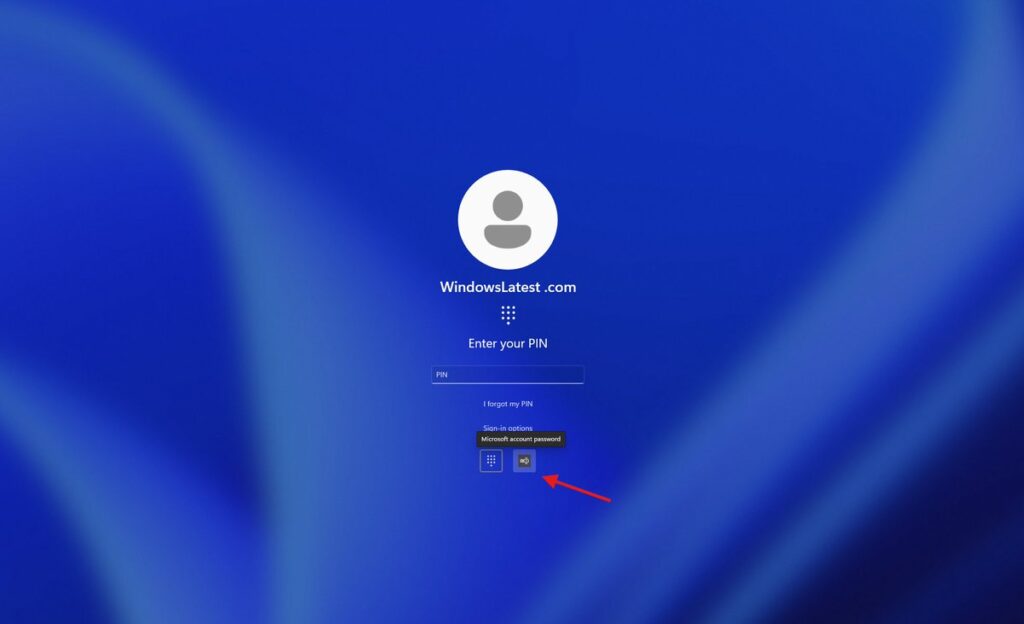
Under normal circumstances, Windows 11 displays icons for each method in the “Sign-in options” menu. However, following KB5064081 or later updates, the password icon fails to render. Instead of appearing in the list, it leaves an empty space where the icon is supposed to be.
The interactive button is still there—but completely invisible. Users must click on a “ghost” button to reveal the password field, adding unnecessary friction during sign-in.
Confirmed Details About the Glitch
| Feature | Details |
|---|---|
| Affected OS | Windows 11 24H2, 25H2 |
| Problematic Update | KB5064081 (August 2025 non-security preview) and later |
| Symptom | Password icon missing from “Sign-in options” |
| Condition | Multiple sign-in methods enabled (PIN, biometrics, etc.) |
| Status | Confirmed by Microsoft; fix in development |
Microsoft Recommends a Temporary Workaround
Until a permanent fix arrives, Microsoft Support has suggested a workaround that requires users to rely on mouse positioning and intuition:
- Open the Sign-in options menu.
- Hover your cursor over the blank area where the password icon should appear.
- When the cursor changes to a hand or the area highlights, click the invisible button.
- The password field will appear, allowing normal sign-in.
While the method works, many users and tech publications have criticized it as unintuitive—essentially forcing people to “click around randomly” to activate the password field.
Fix Coming in a Future Windows Update
Microsoft Windows Engineering Team has acknowledged the bug and confirmed that a fix is currently being developed. Although no official release date has been announced, the patch is expected to arrive in an upcoming Windows service release.
Users who depend heavily on password authentication—or manage devices with multiple sign-in options—should watch for the next cumulative update addressing this UI issue.
