Microsoft Researcher with Computer Use is a groundbreaking new capability inside Microsoft 365 Copilot that allows the AI assistant to go beyond text-based research and actually perform actions on behalf of users within a secure, virtual computer environment.
This marks a major step forward in autonomous AI, combining advanced reasoning with real-world task execution—while maintaining Microsoft’s enterprise-grade security standards.
 How the “Computer Use” Feature Works
At the core of this innovation is a cloud-based virtual machine running on Windows 365, which acts as a temporary, isolated computer created for each Copilot session.
Through this secure sandbox, Copilot can:
- Navigate public websites and authenticated portals
- Click buttons, fill out online forms, and download data
- Access subscription-based or gated content (with user permission)
- Generate sophisticated outputs like PowerPoint presentations, Excel sheets, or research summaries
All these operations happen within a sandboxed virtual environment, ensuring that no data leaves or enters corporate systems without authorization.
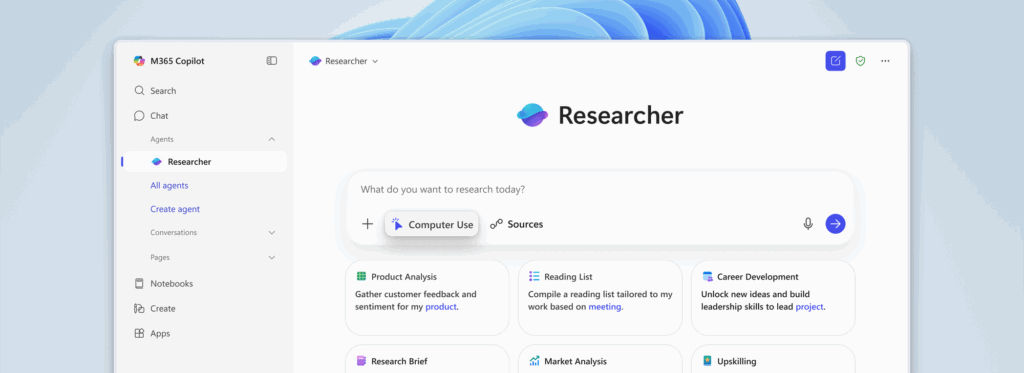
 How Computer Use Transforms Research Capabilities
Microsoft’s Researcher can now handle complex, multi-step research workflows that used to require human intervention.
Example Use Cases:
- Prepare meeting briefs by aggregating social-media and industry insights
- Create curated reading lists from ongoing project materials
- Analyze trends from premium publications that require authentication
- Turn findings into presentations or visual summaries instantly
The AI connects to work data—such as Teams chats, documents, and calendars—while keeping the user in full control of what’s accessed.
 Security and Privacy: Enterprise-Grade by Design
Microsoft built Computer Use with security-first architecture.
Key protections include:
- Sandbox isolation: The virtual machine is separated from user devices and corporate networks.
- No credential exposure: User login data never leaves the secure workspace.
- Automatic data cleanup: All temporary files and sessions are deleted upon completion.
- Full auditability: Every browser action is logged via standard Microsoft 365 Copilot auditing tools.
Additionally, safety classifiers monitor every network action—verifying site safety, content type, and relevance to the user’s query. This prevents prompt-injection and jailbreak exploits that could occur during browsing.
 Administrative Controls and Governance
Enterprise administrators manage Computer Use through the Microsoft Admin Center, where they can:
- Define who has access (via security groups)
- Set allow/deny domain lists
- Control whether users can blend enterprise and public-web data sources
By default, enterprise data access is disabled when Computer Use activates, and users must explicitly approve any data connection.
 Performance and Benchmark Results
According to Microsoft’s internal benchmarks:
- Researcher with Computer Use achieved 44 % better performance on BrowseComp tasks (complex multi-page research).
- It delivered 6 % improvement on GAIA evaluations, which test reasoning across scattered data and corporate records.
These results show that giving Copilot an autonomous environment significantly improves its ability to synthesize information and produce meaningful, real-world results.
 Why This Matters
Microsoft’s integration of Computer Use transforms Copilot from a passive assistant into an active digital collaborator.
It enables knowledge workers to automate repetitive research, securely access restricted content, and generate professional deliverables faster than ever—without compromising security or compliance.
As autonomous AI evolves, Microsoft’s approach—combining capability, control, and compliance—may set a new standard for how organizations adopt responsible, action-oriented AI.
 Conclusion
Microsoft Researcher with Computer Use represents a major leap in applied AI.
By merging secure virtual computing with intelligent automation, it bridges the gap between information retrieval and action—helping professionals move from insight to output effortlessly.
The future of enterprise research is no longer just about asking questions—it’s about AI that can safely act on the answers.
