Threat actors are evolving the ClickFix attack playbook—and this time, they’re weaponizing a trusted Windows utility: nslookup.exe.
Instead of relying on noisy PowerShell commands, attackers are now staging malicious payloads through DNS queries using nslookup.exe, blending seamlessly into legitimate network diagnostics traffic. This stealthier technique significantly complicates detection for SOC teams and threat hunters.
First observed by security researcher Muhammad Hassoub, this evolution marks a critical shift in living-off-the-land (LotL) tradecraft.
In this deep-dive, we’ll explore:
- How the new ClickFix attack variant works
- Why abusing nslookup.exe is more evasive
- Technical mechanics of DNS-based payload staging
- Detection and hunting strategies
- Defensive recommendations for blue teams
What Is the ClickFix Attack?
The ClickFix attack is a social engineering technique that tricks users into executing malicious commands under the guise of resolving fake system errors.
Traditionally, ClickFix campaigns:
- Display fake error prompts
- Instruct users to copy-paste PowerShell commands
- Execute malicious payload retrieval scripts
These PowerShell-based methods, however, became easier to detect due to:
- Command-line logging
- EDR telemetry
- PowerShell script block monitoring
Now, attackers are adapting.
The Shift: Abusing nslookup.exe for Payload Staging


4
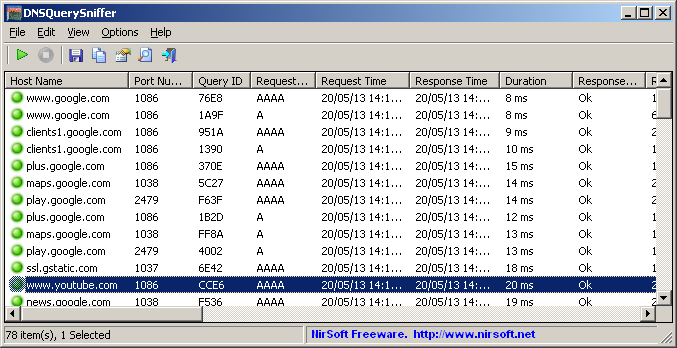
Instead of PowerShell, attackers are now leveraging nslookup.exe, a legitimate Windows binary used for DNS troubleshooting.
Why nslookup.exe?
- Native Windows binary (trusted)
- Frequently used by administrators
- Rarely blocked
- Often ignored in behavioral monitoring
This aligns with Living-off-the-Land (LotL) tactics—using legitimate system tools for malicious purposes.
How the DNS-Based Payload Delivery Works
Step-by-Step Execution Chain
- Victim is deceived via ClickFix-style prompt
- User executes an nslookup command
- nslookup queries an attacker-controlled DNS server
- The DNS server responds with encoded malicious payload data
- Payload is delivered in the DNS “Name” response field
- Data is extracted and executed locally
The Critical Evasion Technique
Most DNS-based malware uses:
- TXT records
- Suspicious subdomain encoding
This variant instead abuses the “Name” field in DNS responses.
Because security tools typically monitor TXT records more aggressively, the Name field approach significantly reduces detection signatures.
Key Insight:
The innovation isn’t DNS abuse—it’s where the payload is hidden within DNS responses.
Why This Technique Is Harder to Detect
1. Trusted Binary Execution
nslookup.exe is:
- Signed by Microsoft
- Common in enterprise environments
- Rarely flagged in isolation
2. Minimal Telemetry Noise
Compared to PowerShell:
- No script block logs
- No encoded command-line flags
- Lower behavioral suspicion
3. DNS Traffic Blending
DNS is:
- High-volume
- Always-on
- Business-critical
Malicious queries can hide within normal traffic patterns.
Detection Challenges for Security Teams
Traditional ClickFix detection strategies focused on:
- Suspicious PowerShell execution
- Encoded PowerShell commands
- Command-line artifacts
This DNS-based variant bypasses those controls entirely.
Security teams must now monitor:
- Unusual nslookup execution contexts
- Queries to newly registered domains
- DNS responses with unusually large Name fields
- Repeated encoded-looking responses
Threat Hunting & Detection Strategies
Researcher Muhammad Hassoub developed CrowdStrike CQL hunting queries to detect suspicious nslookup behavior.
While specific query logic varies by environment, effective detection strategies include:
1. Behavioral Monitoring
Alert on:
- nslookup.exe launched by non-admin users
- nslookup execution triggered by browsers
- nslookup followed by unusual process spawning
2. DNS Analytics
Inspect for:
- High-entropy DNS Name responses
- Excessively long domain strings
- Queries to newly registered domains
3. Parent-Child Process Relationships
Monitor for:
- Browser → cmd.exe → nslookup.exe chains
- Office applications spawning nslookup
4. EDR Telemetry Correlation
Correlate:
- DNS logs
- Process execution logs
- Network connections
- Script interpreter activity
Risk Impact Analysis
Enterprise Risk
If successfully executed, this technique can:
- Deliver second-stage payloads
- Establish persistence
- Deploy ransomware
- Exfiltrate sensitive data
Why It Matters
Living-off-the-land tactics reduce detection surface, allowing attackers to:
- Prolong dwell time
- Avoid signature-based alerts
- Evade PowerShell-focused monitoring
This represents a strategic shift in attacker tradecraft.
Defensive Recommendations
1. Expand Beyond PowerShell Monitoring
Blue teams must:
- Include nslookup.exe in threat hunting scope
- Monitor built-in binaries (LOLBins)
- Apply MITRE ATT&CK-aligned detection mapping
Relevant ATT&CK Techniques:
- T1059 – Command and Scripting Interpreter
- T1218 – Signed Binary Proxy Execution
- T1071 – Application Layer Protocol (DNS)
2. Harden DNS Monitoring
Implement:
- DNS logging at resolver level
- Detection of anomalous DNS record sizes
- Reputation filtering for suspicious domains
Consider deploying:
- DNS firewall solutions
- Threat intelligence domain feeds
- Newly registered domain monitoring
3. Enforce Least Privilege
Limit:
- Unnecessary command-line tool access
- Local admin privileges
- Browser-initiated command execution
4. User Awareness & Social Engineering Defense
ClickFix still begins with deception.
Educate users to:
- Avoid executing commands from web prompts
- Verify error messages
- Report suspicious instructions
The Bigger Picture: Living-Off-the-Land Evolution
The abuse of nslookup.exe demonstrates a broader trend:
- Attackers are moving toward stealth
- Trusted binaries are becoming weaponized
- Detection must shift from signatures to behavior
As defenders harden PowerShell telemetry, adversaries pivot to alternate binaries.
Expect future campaigns to leverage:
- certutil.exe
- mshta.exe
- wmic.exe
- bitsadmin.exe
The attack surface includes every trusted system utility.
Frequently Asked Questions (FAQs)
1. What is the ClickFix attack?
ClickFix is a social engineering tactic that tricks users into executing malicious commands disguised as system fixes.
2. Why is nslookup.exe being abused?
Because it is a legitimate Windows tool that blends into normal DNS troubleshooting activity, reducing detection likelihood.
3. How does DNS deliver the payload?
The attacker-controlled DNS server embeds encoded malicious data in the DNS Name response field, which is then executed locally.
4. Why don’t traditional security tools detect this?
Many tools focus on PowerShell activity or TXT DNS records. This technique uses a trusted binary and the Name field instead.
5. How can organizations defend against this?
By implementing behavioral detection, enhanced DNS monitoring, least privilege access controls, and user awareness training.
Conclusion
The new ClickFix variant abusing nslookup.exe for DNS-based payload staging underscores how quickly attackers adapt.
This is not just a technique change—it’s a detection strategy bypass.
Security teams must:
- Expand threat hunting beyond PowerShell
- Monitor trusted binaries
- Analyze DNS telemetry deeply
- Adopt behavior-based detection
In today’s threat landscape, every legitimate tool can become a weapon.
Proactive hunting and layered defenses remain the only sustainable strategy.
